Free Vacation Rental Software for Villas and Holiday Homes
One calendar for every booking: Airbnb, Booking.com, Vrbo, your own direct reservations and phone calls. No double bookings. No missed guests. Check-in, invoicing with your own tax rate and currency, and daily reports. Free. No subscription, no trial period.
OnlineHotelier PMS is a free vacation rental management system for villas and holiday homes. It puts every booking in one calendar: Airbnb, Booking.com, Vrbo, direct reservations and phone calls. Guest check-in, invoicing with your own currency and tax rate, and daily reports are included at no cost. This is not a full vacation rental platform like Lodgify or Hostaway. It covers reservations, billing and check-in well. The optional paid add-on is the channel manager, which syncs availability to your OTAs automatically.
OnlineHotelier PMS at a glance
| Product | OnlineHotelier PMS, a free cloud reservation and management system for villas and holiday homes |
|---|---|
| Price | Free. No subscription, no trial period |
| Who it is for | Villa owners and holiday home operators who need one place to manage reservations, billing and guest check-in across multiple booking channels |
| OTAs covered | Airbnb, Booking.com, Vrbo and other platforms (manual entry for all; automatic sync via the channel manager add-on) |
| Tax and currency | Set your own currency and tax rate. No country-specific rates are built in: you decide what applies to your property |
| Paid add-on | Channel manager that syncs availability and rates to Airbnb, Booking.com and other supported OTAs. Pricing on WhatsApp |
| Runs on | Any web browser on a phone, tablet or laptop. Nothing to install |
| How to start | Sign up online, or message us on WhatsApp for guided setup |
What villa and holiday home management actually needs
Running a villa or holiday home is different from running a hotel. You have fewer units, often just one or two. Your bookings come from several places at once: Airbnb, Booking.com, Vrbo, your own website, returning guests who email or call directly.
That spread is the problem. A booking on one channel does not automatically block the same dates everywhere else. Miss an update and you have two guests arriving on the same night.
What you need is straightforward:
- One calendar that shows every booking from every source
- A clean way to handle check-in and bill the guest on departure
- Invoicing that works in your currency with the tax rate that applies to you
- Daily visibility into what is booked, what is vacant and what is coming up
That is what the OnlineHotelier PMS covers. It does not include owner statements, damage deposit tracking, or automated cleaning schedules. Those functions sit outside its scope. What it does, it does well and it costs nothing.
Direct bookings are a channel too. Guests who book by phone, email or through your own website go into the same calendar as your Airbnb and Booking.com reservations. This is how you see your true occupancy in one place. Read our guide on getting your villa listed on the right OTAs before you decide how many channels you need to manage.
One availability calendar for Airbnb, Booking.com, Vrbo and direct
Your villa is listed on Airbnb. A family in Germany books it for two weeks in August. The next morning, a returning guest emails you directly asking about the same dates. Without a shared calendar, you are working from memory or a spreadsheet.
The OnlineHotelier calendar puts every booking in one view. You see which unit is booked on which nights, where the booking came from, and what is still available. Every source feeds the same picture:
- Airbnb, Booking.com, Vrbo and other platforms (entered manually, or synced through the channel manager add-on for the platforms it supports)
- Direct enquiries from your own site, email or repeat guests
- Phone reservations and walk-in bookings entered at the front desk
When a unit is blocked, it shows as taken. No double booking. When you add the channel manager add-on, a booking on any connected platform closes that unit on all the others automatically.
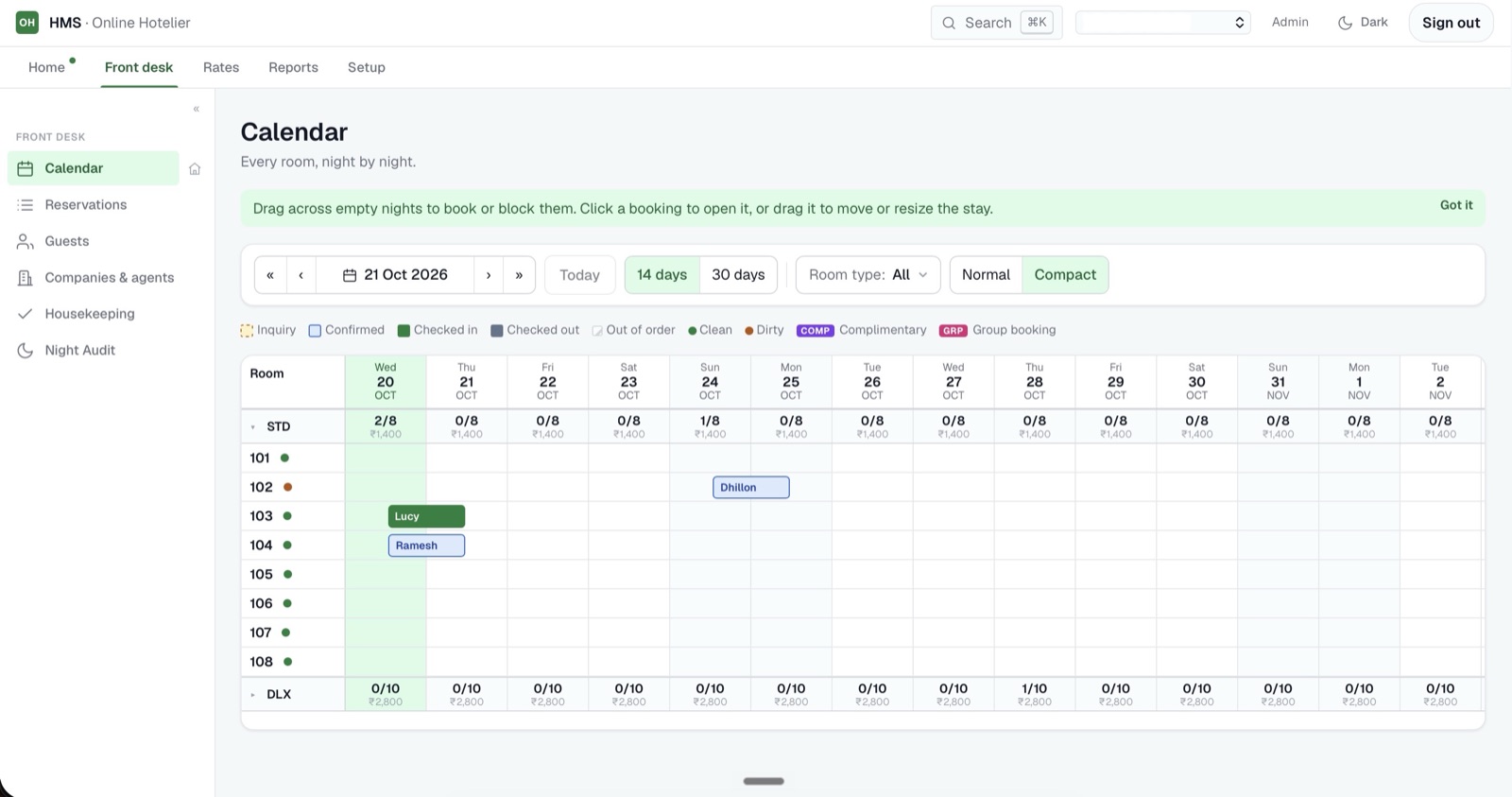
Why not just use Airbnb's calendar? Airbnb's built-in calendar only shows Airbnb bookings. A booking from Booking.com or Vrbo, or a direct call from a returning guest, does not appear there. The result is two separate calendars to check and a double booking waiting to happen. The OnlineHotelier calendar is the one place where your full occupancy is visible.
Invoicing with your own currency and tax rate
Villas and holiday homes operate in every country and every currency. Tax rules vary: some markets charge VAT on short-term rentals, others have local accommodation levies, and many small properties fall below any registration threshold altogether.
The PMS does not apply a country-specific rate for you. You set your own currency and your own tax percentage in the settings. If you charge tax, the bill calculates it automatically on every folio. If you do not, you leave the tax field at zero.
What the invoice covers:
- Room or unit charge for the stay
- Any extras added to the folio during the stay
- Your tax rate, applied automatically to the total
- Payment record: how the guest paid and when
Seasonal rates: you can set different room rates for peak season, shoulder season and off-peak periods. When you create a booking, you apply the rate that applies to that stay. This is straightforward manual rate management. Fully automated dynamic pricing rules are outside the scope of the free PMS.
If you are unsure whether your property is required to register for VAT or a local accommodation tax, check with a local accountant. The PMS will apply whatever rate you set. It does not submit returns or file reports to any tax authority.
Guest check-in and check-out
When a guest arrives, check-in takes a few steps.
Record the guest
Enter the guest's name, passport or ID number, nationality, and number of nights. The system opens a folio (a running bill) from the moment they check in.
Track the unit
Mark the villa or unit as occupied. If you have multiple units, the front desk view shows which are taken and which are free, updated in real time.
Add charges during the stay
Post any extras to the folio as they occur: late check-out fees, additional nights, or services provided. The folio keeps a running total.
Bill and check out
At departure, review the folio, apply your tax rate, and issue the invoice. Record how the guest paid. The room status updates to vacant when you check them out.
Daily reports show you occupancy, average rate and revenue for each day. If you manage several units, you see totals across the property at a glance. No manual calculation needed.
Guest-list exports are available on request. If your local authority requires you to report guest stays, message us on WhatsApp and we will set up an export format for your property.
Channel manager: for when manual updates become a problem
If you are on one or two platforms and you update your calendar after each booking, the free PMS covers everything you need. Most villa owners with a small number of bookings start here.
The channel manager add-on becomes the right choice when you are on three or more OTAs and updating availability by hand after each booking is slow or error-prone. When a booking arrives on Airbnb, the add-on closes the unit on Booking.com and every other connected channel in the same moment. No manual update. No double booking risk.
Read our guide on what a channel manager does and when you need one before deciding whether the add-on makes sense for your property size and booking volume.
The channel manager add-on is paid. The free PMS is the right starting point for most villa owners. When you are ready to connect your OTAs automatically, message us on WhatsApp and we will give you the current price for your property.